I want to talk about a change that looks like boring housekeeping and is actually a meaningful shift in how much control you have over your own privacy. Apple is changing the domain behind Hide My Email. On the surface it's a footnote. Underneath, it tells you something important about the difference between privacy you borrow and privacy you own — and it's a perfect excuse to set up something better.
What Hide My Email does, and what's changing
If you live in Apple's world, you've probably bumped into Hide My Email. It's part of iCloud+, and it's genuinely one of the easiest privacy wins available to a normal person. Instead of handing a website your real address, Apple generates a random, unique alias. The site emails the alias, Apple forwards it to your real inbox, and if that alias ever starts attracting spam, you switch it off. Different address for every service, no thought required, built right into the sign-up screen. I recommend that kind of email compartmentalization to everyone.
Here's what's changing. Until now, Hide My Email aliases used the plain icloud.com domain — the exact same domain as every ordinary iCloud mailbox. Sign in with Apple used a separate one, privaterelay.appleid.com. Apple is unifying both of those under a single new domain, private.icloud.com, rolling out later this summer.
Sounds tidy. So why am I dedicating a whole post to it?
Why this is bad for users
The strength of an email alias isn't only that it's disposable. It's that it's indistinguishable from a normal address. That's the whole trick. When your Hide My Email alias ended in @icloud.com, it looked exactly like a real iCloud account — because as far as the receiving server could tell, it might as well have been one.
That created a problem for any website that wanted to ban disposable Apple addresses — say, to stop people spinning up endless free trials. To block the throwaways, they'd have to block icloud.com entirely, which would also lock out millions of legitimate Apple users with normal iCloud mail. Too much collateral damage. So most of them simply didn't bother. Your disguise worked precisely because you were standing in a crowd.
Move all the aliases onto a dedicated private.icloud.com subdomain and that camouflage is gone. Now any website, any sign-up form, any anti-abuse system can block that single subdomain — catching every Apple alias in one clean rule, without touching a single real iCloud account. Security researchers flagged the implication within hours of the announcement: platforms that want to refuse Apple aliases now have an easy, unambiguous target.
A couple of things to be clear about, because I don't want to fearmonger. Your existing aliases on the old domains keep working — Apple says mail will continue to forward with no interruption. It's only new aliases generated after the migration that carry the blockable private.icloud.com domain. And to be fair, plenty of services will never bother blocking them at all.
But the principle is what matters here. Apple almost certainly understood this trade-off and shipped it anyway. And it's a reminder of something I come back to constantly on this show: when your privacy depends on a single company's design decisions, you are one quiet product update away from having it weakened. You didn't get a vote. You got a changelog.
The fix isn't to panic-quit Apple. The fix is to stop renting your email identity and start owning it.
The better setup: your own domain + SimpleLogin + Proton Mail
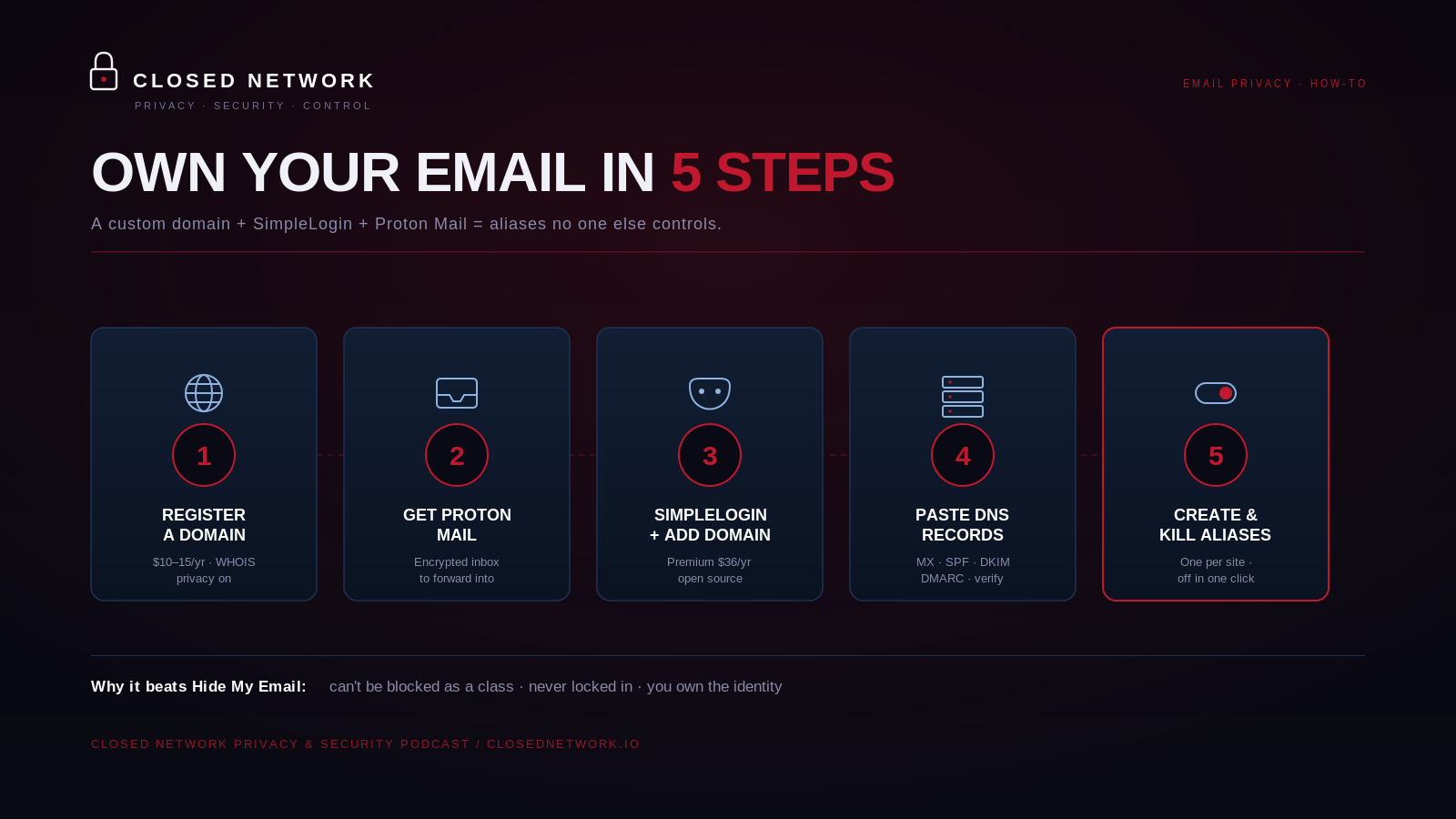
Here's the alternative I actually use and recommend. You register a domain name that you control, you point an aliasing service at it, and you forward everything into a private mailbox. Three pieces:
- A domain you own — so nobody can block "all your aliases" as a class, and so you're never locked to one provider.
- SimpleLogin — the open-source aliasing engine that runs on top of your domain. It's owned by Proton and the code is public, so you don't have to take anyone's word for what it does.
- Proton Mail — an encrypted mailbox to forward into (any inbox works, but Proton keeps the whole stack privacy-first).
It is far less technical than it sounds. Here's the whole thing, start to finish.
Step 1 — Register a domain you control
Go to a privacy-respecting registrar — Cloudflare, Porkbun, and Namecheap are all solid — and buy a domain. Make it short and boring on purpose; nobody needs to see it but you, so something forgettable is perfect. Expect to pay roughly $10–$15 a year. While you're checking out, turn on WHOIS privacy so your name and home address don't end up in a public registration lookup — the good registrars include that for free now.
Step 2 — Get a Proton Mail account to forward into
If you don't already have one, set up Proton Mail. The free tier is fine to start. This is the real inbox that all your aliases will quietly funnel into, and it stays completely hidden from every website you sign up with. (You can absolutely forward into Gmail or an existing inbox instead — but if you're doing a privacy reset, a clean Proton mailbox is a nice place to land.)
Step 3 — Get SimpleLogin Premium and add your domain
SimpleLogin has a free tier (10 aliases), but custom domains live on Premium, which is $36/year — or $4/month if you'd rather pay monthly. That gets you unlimited aliases, unlimited custom domains, catch-all, PGP encryption, and they've now folded in Proton Pass Premium (their password manager with dark-web monitoring and a built-in 2FA authenticator) at no extra cost. If you're a student, a journalist, an activist, or a charity, email their support — they hand out discounted or free Premium for those folks. You can even pay in crypto. Inside SimpleLogin, go to the Domains section and add the domain you just bought.
Step 4 — Paste a few DNS records (the only mildly technical bit)
SimpleLogin will hand you a short list of DNS records to add at your registrar:
- an MX record, so mail for your domain routes to SimpleLogin,
- SPF, DKIM, and DMARC records, which are just the standards that prove your mail is legitimate and keep your aliases out of spam folders.
You copy each one from SimpleLogin, paste it into your registrar's DNS settings, and click verify. The first time, it's maybe ten minutes of copy-paste. DNS can take a little while to propagate, so if verification doesn't go green instantly, give it an hour. After this, you never touch it again.
Step 5 — Start creating aliases
Now the payoff. You can invent an address on the fly for anything:
- Newsletter signup?
newsletter@yourdomain.com. - New bank?
bank@yourdomain.com. - Sketchy store you don't trust? Make one up right at the checkout screen — with catch-all turned on, SimpleLogin captures it and forwards it to Proton automatically, no pre-registration needed.
You can reply from any alias too, so the recipient never sees your real address. And the day an alias starts getting spam or turns up in a breach, you kill it with one click — and you know exactly who leaked or sold it, because only one company ever had that address.
Why this beats Hide My Email
Three reasons, and they're the whole point of this post.
You can't be blocked as a class. Your aliases live on your own domain, which looks like every other custom domain on the internet. There's no shared private.icloud.com flag for a website to filter on.
You're not locked in. Don't like SimpleLogin someday? Point the same domain at a different provider and every alias you've ever made keeps working. Try migrating away from Apple's aliases that cleanly. And here's a detail I love about SimpleLogin specifically: if you ever cancel Premium, the aliases you've already created keep sending and receiving — you just can't make new ones past the free limit. Your mail is never held hostage.
You own the identity. No quiet product update can take a uniform you control and pin a target on it.
That's really the through-line of everything we do here. Wherever you reasonably can, own the thing instead of borrowing it. A ten-dollar domain and one focused afternoon buys you an email identity that no single company gets to weaken on a summer afternoon while you're not looking.
Keep using Hide My Email if you like — it's still a decent tool. Just don't let it be the only thing standing between you and a thousand databases. Build something you control underneath it.
Stay safe out there.
— Simon